
Super Scanner
Why is your site stuck on old PHP? Is it hacked? Find out free.
Old PHP gets no security fixes, and that is how many sites get hacked. The upgrade usually "breaks the site" because of one old plugin, theme or line of code. Super Scanner finds it, and checks for malware while it is there.
No sign-up, no password. The quick scan only looks at what any visitor can see.
How it works
Free until you decide.
Both scans cost nothing. You only pay if you want us to do the fixing.
-
1Free · 30 seconds
Quick scan
Your PHP version and how long it is still supported, your platform, every plugin and theme we can see compared with its latest version, and outside signs of malware.
-
2Free · a few minutes
Deep scan
Put one small read-only file on your site with File Manager. We read every line of code, compile it on the real PHP 7.4 to 8.5, and check your files for malware. The file deletes itself when done.
-
3US$70 one time
Fix, if you want
You get a clear report and the plan that fits it. Want us to do it? Fix this issue only, or keep it fixed with a monthly plan. Every file is backed up first. Then scan again to see it worked.
What we check
Everything that stops the upgrade, or hints at a hack.
PHP and server
Which PHP really runs, when it stops getting fixes, and settings that pin the site to an old version or turn the switch into a 500 error.
Plugins and themes
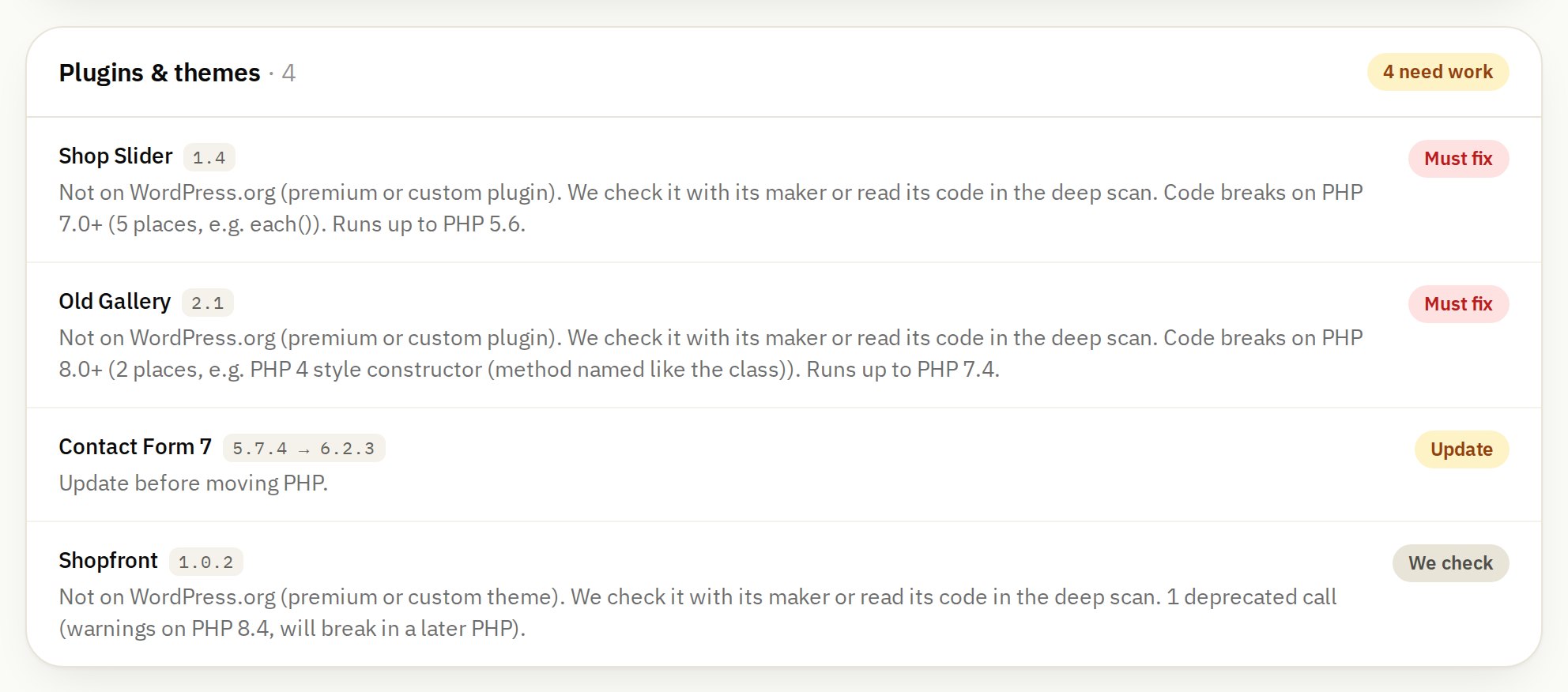
Installed versus latest version, plugins their makers abandoned or WordPress.org closed, premium ones to check with their makers.
Every line of code
Around 200 rules for what PHP 7.0 to 8.5 removed or deprecated, deprecated WordPress functions and old jQuery, with the exact file and line.
Tested on real PHP
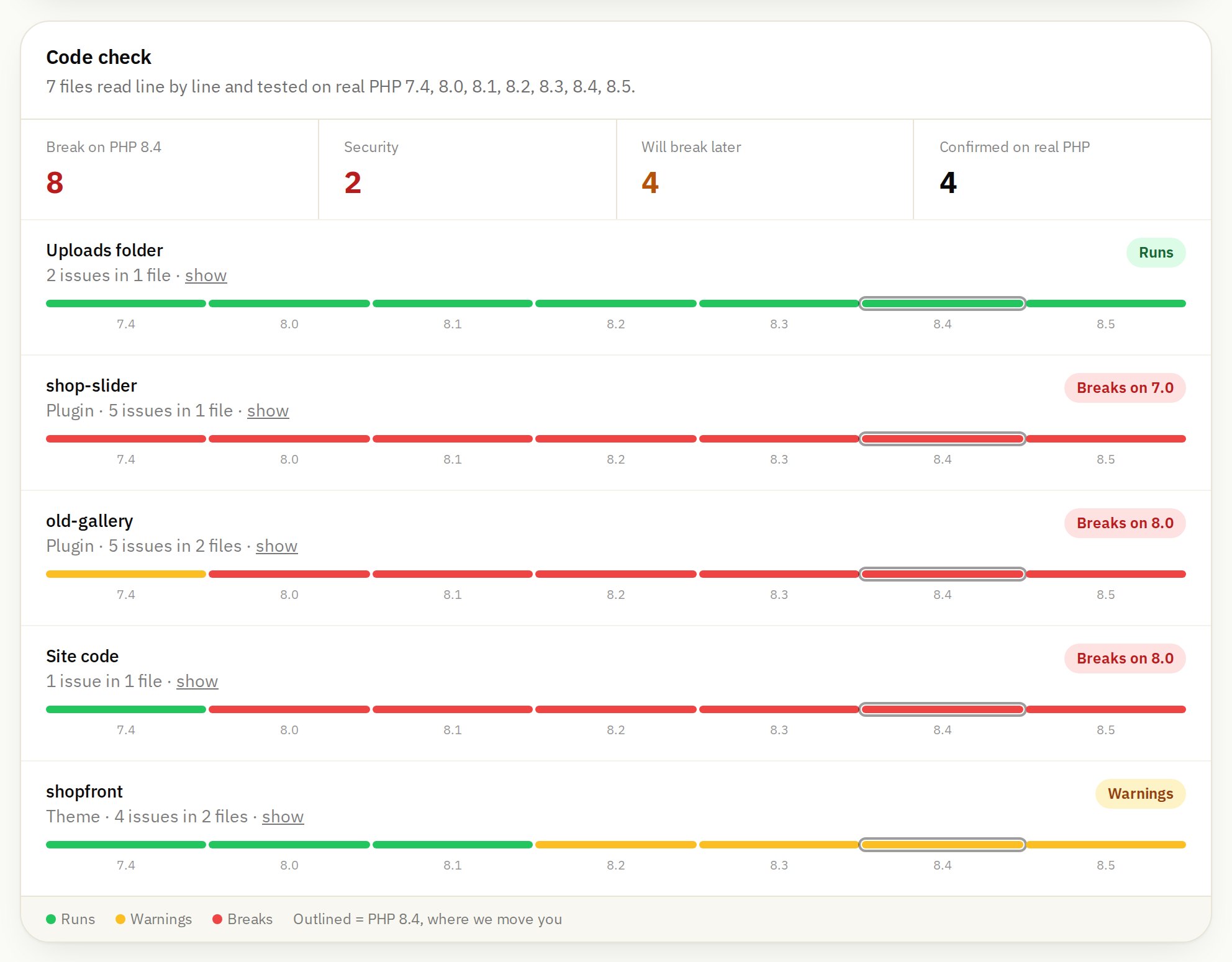
Each PHP file is compiled on the real PHP 7.4, 8.0, 8.1, 8.2, 8.3, 8.4 and 8.5, so you see which version each part runs on. Tested, not guessed.
Malware and hacking
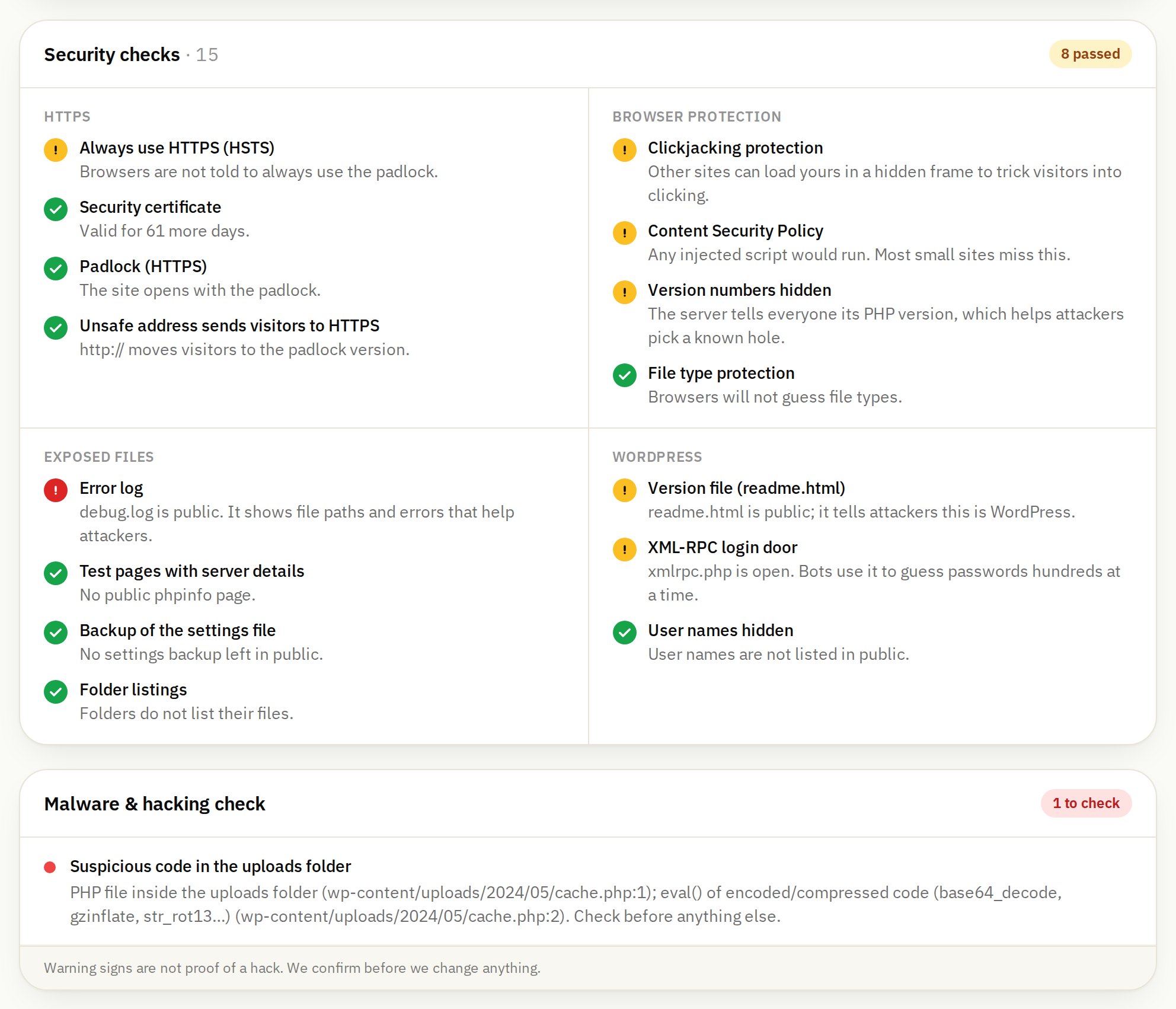
Backdoors, hidden code, PHP in the uploads folder, changed WordPress core files, spam shown only to Google, and phone visitors sent elsewhere.
A plan, in order
What to clean, update, replace and patch, step by step, and what it would cost if you want us to do it.
Works for WordPress, Joomla, Drupal, Laravel and plain PHP sites, and for JavaScript sites: Next.js, React, Nuxt, Angular, Astro and Node.js are found automatically and checked against known security holes and the safest supported version. Shopify, Wix and similar run their own servers, so there is nothing for you to upgrade there (we still check for hacking signs).
What you get
A report you can actually read.
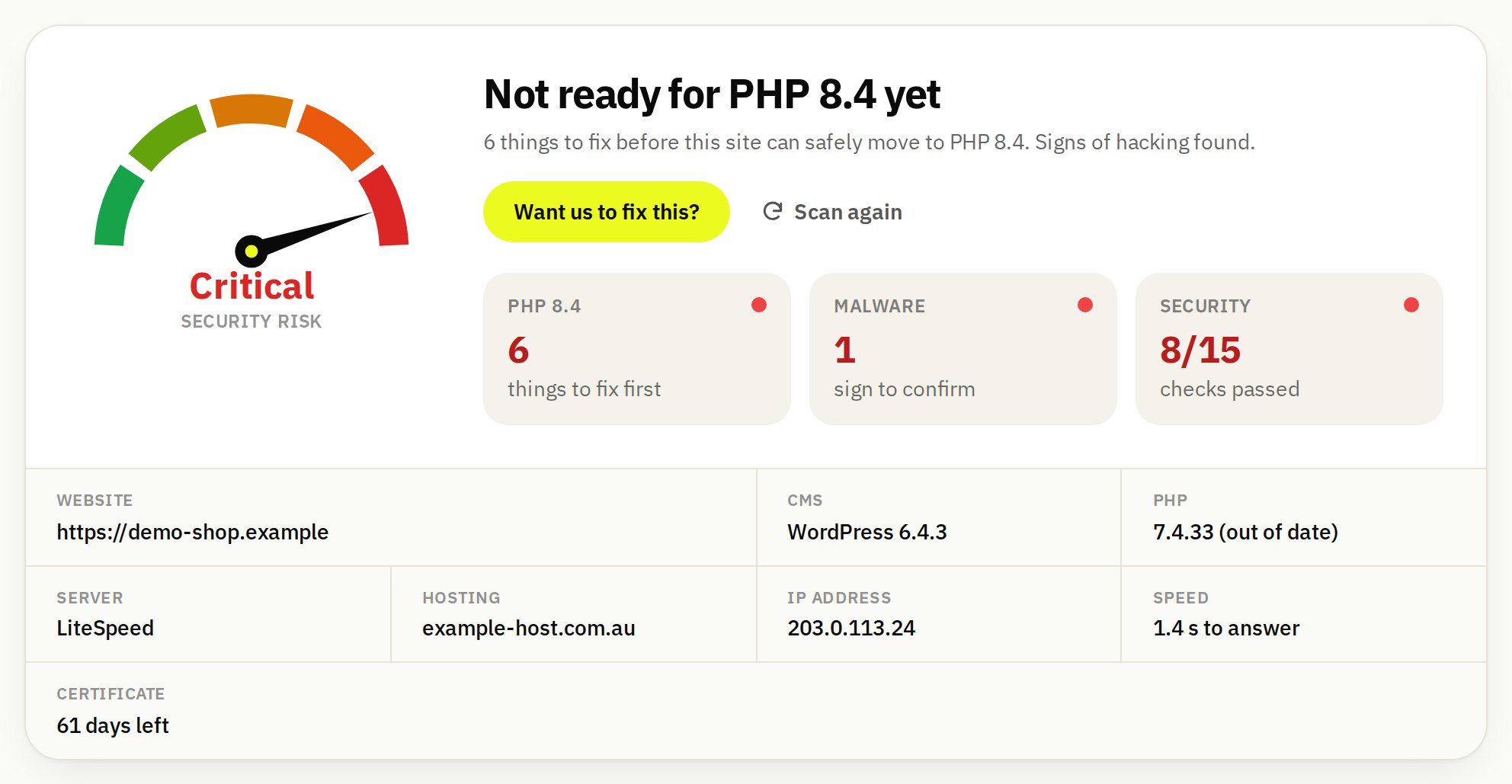
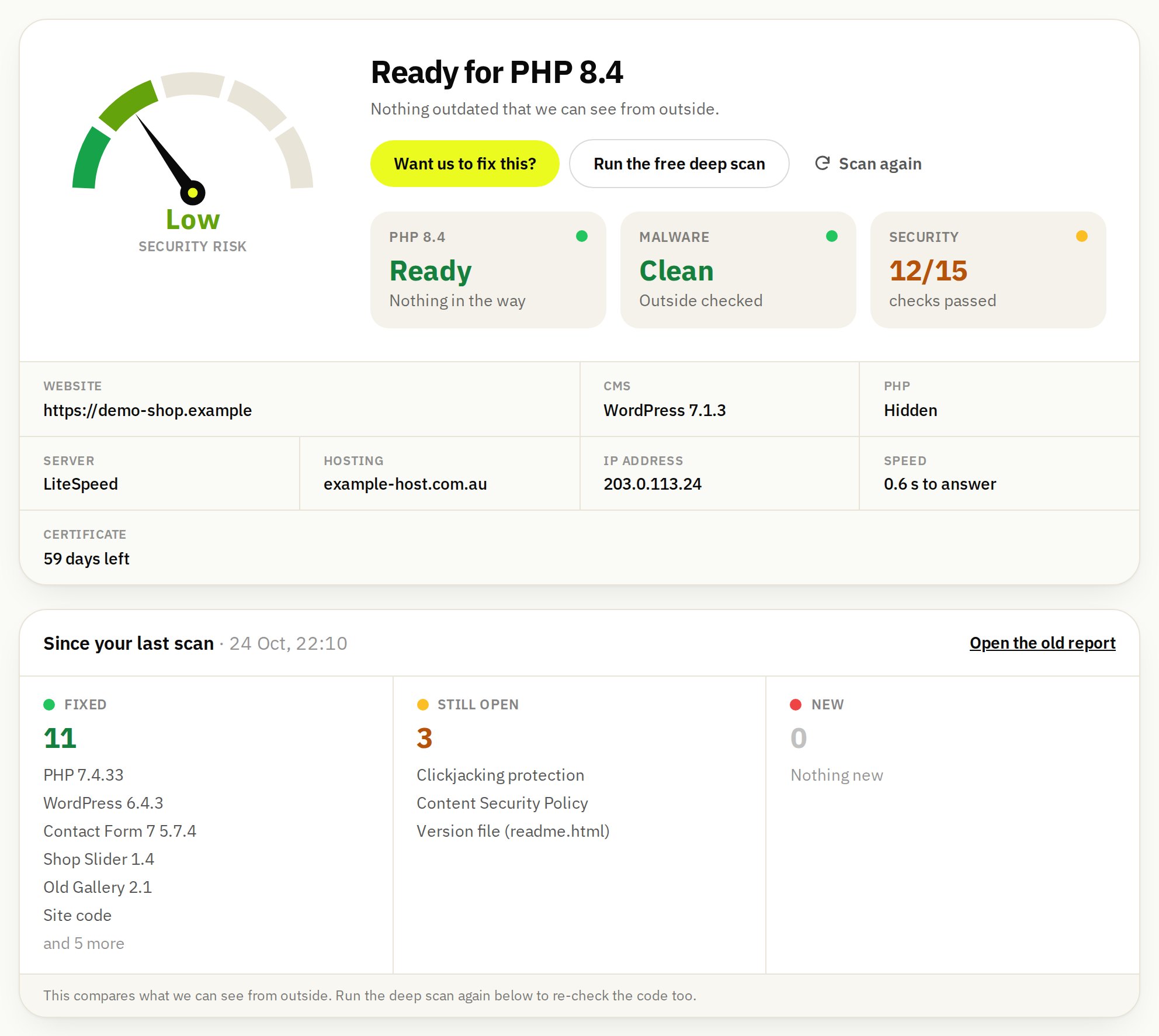
Plain words, exact places, and the order to fix things in. Pictures from a sample report of a test site.
Why Super Scanner
Other scanners tell you something is wrong. We tell you what, where, and how to fix it.
| Super Scanner | Typical free online scanners | Typical security plugins | |
|---|---|---|---|
| Free to use | ✓ | ✓ | often paid for the full scan |
| No password and nothing to install | ✓ | ✓ | ✕ install it in wp-admin |
| Finds what blocks a PHP upgrade | ✓ | ✕ | ✕ |
| Reads every line of your code | ✓ | ✕ outside only | ✓ |
| Tests your code on real PHP 7.4 to 8.5 | ✓ | ✕ | ✕ |
| Malware checks inside your files | ✓ | ✕ outside only | ✓ |
| Compares WordPress core with the official copies | ✓ | ✕ | often |
| Works for Joomla, Drupal, Laravel and plain PHP | ✓ | partly | ✕ WordPress only |
| A plan in plain words, and people who fix it | ✓ | ✕ | ✕ |
"Typical" means most tools of that kind we know of; some do more. Online scanners only see your pages from outside; plugins run inside WordPress and usually do not look at PHP versions.
Questions
Before you scan
Is it really free?
Yes. The quick scan and the deep scan are free, and so is the report. You only pay if you ask us to fix things, at a fixed price we confirm before you pay.
Do you need my hosting password?
No. For the deep scan you upload one small file yourself with File Manager. It can only read, it only answers us, it blanks out your passwords before anything leaves your server, and it deletes itself when the scan ends.
Will the scan change or slow down my site?
No. Nothing on your site is changed and nothing is run on it except reading files. The compiling happens on our server, on copies.
What if the scan finds malware?
You see exactly where. Signs are not proof, so we confirm before cleaning. Cleaning is part of the fix if you want us to do it, and we always clean first: upgrading a hacked site just gets it hacked again.
What does the fix cost?
Fixing what your report found is US$70 one time (launch price, normally US$120). Or keep the site updated and safe with a monthly plan from US$24 a month during the launch offer. The report shows the plan that fits your site. Every file is backed up before we touch it.
Can I check that the fix worked?
Yes. Press "Scan again" on your report at any time. The new report shows what is fixed, what is still open and anything new since the last scan.